This is the first post in Road to playtest, a short series on the systems we are hardening before founding members get the release/1.0.0-playtest build on 17 July. A full build walkthrough is drafted and will publish closer to the window. This one is about Brand.
Most airline sims treat brand as cosmetics: pick a livery, maybe a slogan, move on. In Skyline, brand is an operating screen. It tracks how the market sees you, gates premium products, and forces real tradeoffs when you launch a frequent-flyer program or commit capex to a lounge. The screenshots below are from a live save (Slotty Air, score 43, ESTABLISHED tier). Same UI that ships in the playtest branch.
Four tabs, one workstation
The Brand screen splits into four tabs:
| Tab | Sub-label | What you do there |
|---|---|---|
| IDENTITY | Reputation | Read your carrier tier, score breakdown, and story timeline |
| LOYALTY | Ecosystem | Manage FFP, partners, lounges, and member mood |
| STRATEGY | Positioning | Set customer-profile sliders that feed yield |
| MARKETING | Campaigns | Run timed campaigns (not shown here; still rough in playtest) |
Wizards for Build Lounge and Launch FFP open from LOYALTY and take over the full screen until you confirm or cancel. That is intentional: these are irreversible or long-lock decisions, not toggle settings.
IDENTITY · reputation score
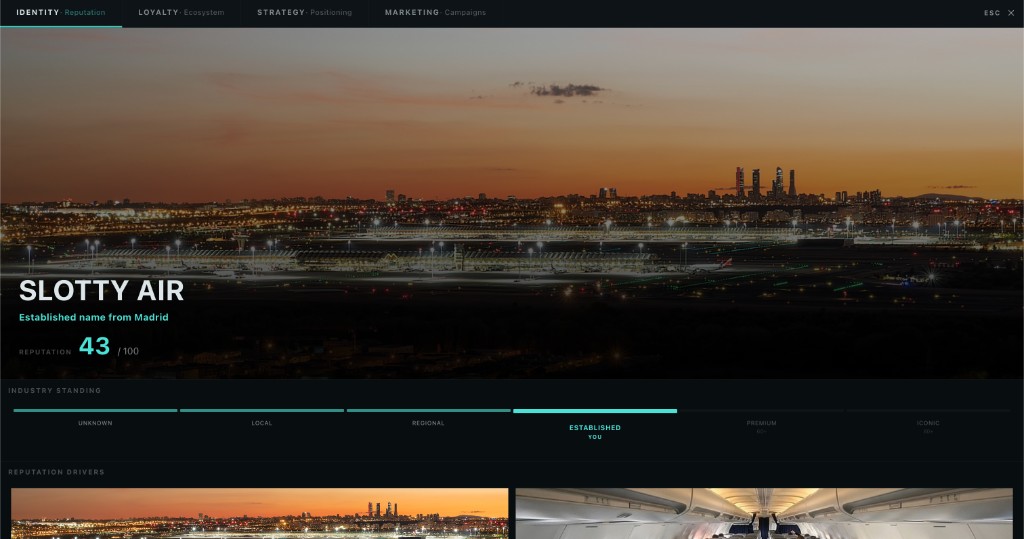
Your reputation score is a 0–100 composite built from five components the engine recalculates every month:
- Heritage (0–30): years operating plus heritage events
- Service (0–30): crew morale and operational consistency
- Loyalty (0–20): FFP launch, tier breadth, partner count
- Premium credibility (0–20): positioning slider plus lounge network
- Network (0–20): alliance membership and route breadth
The UI maps that total to a carrier tier ladder:
| Tier | Min score | Subtitle |
|---|---|---|
| UNKNOWN | 0 | Unrecognized |
| LOCAL | 5 | Neighborhood carrier |
| REGIONAL | 20 | Regional carrier |
| ESTABLISHED | 40 | Established name |
| PREMIUM | 60 | Premium carrier |
| ICONIC | 80 | Iconic brand |
Slotty Air sits at 43, just into ESTABLISHED, with PREMIUM (60) as the next milestone. The right rail calls out the weakest component so you know where to invest: run better ops for Service, launch loyalty for Loyalty depth, open lounges for Premium credibility.
Reputation is not vanity. It feeds partner gates (co-branded credit cards need brand strength ≥ 40), board approval checks on FFP launch, and the broader demand model. Neglect brand and premium products stay locked or underperform.
LOYALTY · ecosystem dashboard
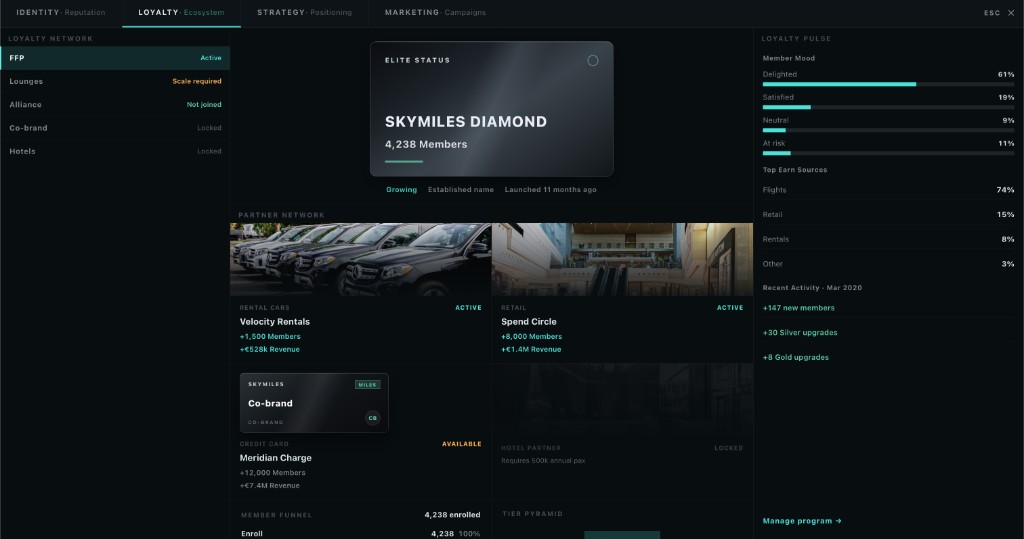
Once you have (or are planning) a loyalty stack, LOYALTY becomes the control room. You see FFP health, partner coverage, lounge footprint, and member mood in one place. Build Lounge and Launch FFP are the two big actions. Everything else on this tab is telemetry: are members happy, are partners pulling weight, does the lounge network match your positioning?
In the playtest build you can run without ever touching this tab. You will leave yield and retention on the table. The sim is built assuming mid-game carriers invest here.
Lounge network
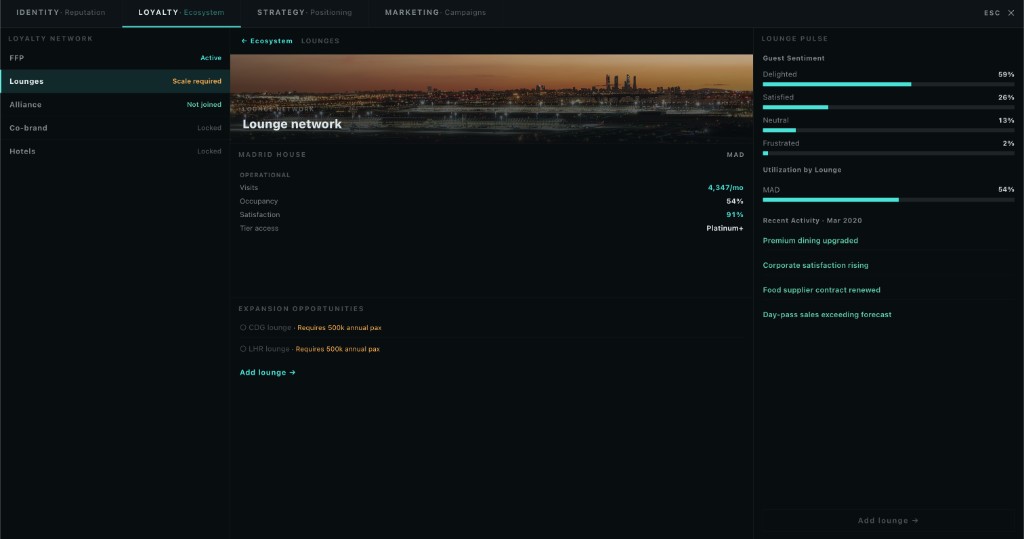
Lounges are capex decisions with ongoing opex. The network view shows what you have opened, where, and what each property costs to run. New lounges require 500k annual passengers through the hub before the build wizard unlocks, and the archetype you pick (legacy club vs premium house) gates which FFP tiers get access.
Build lounge: six steps
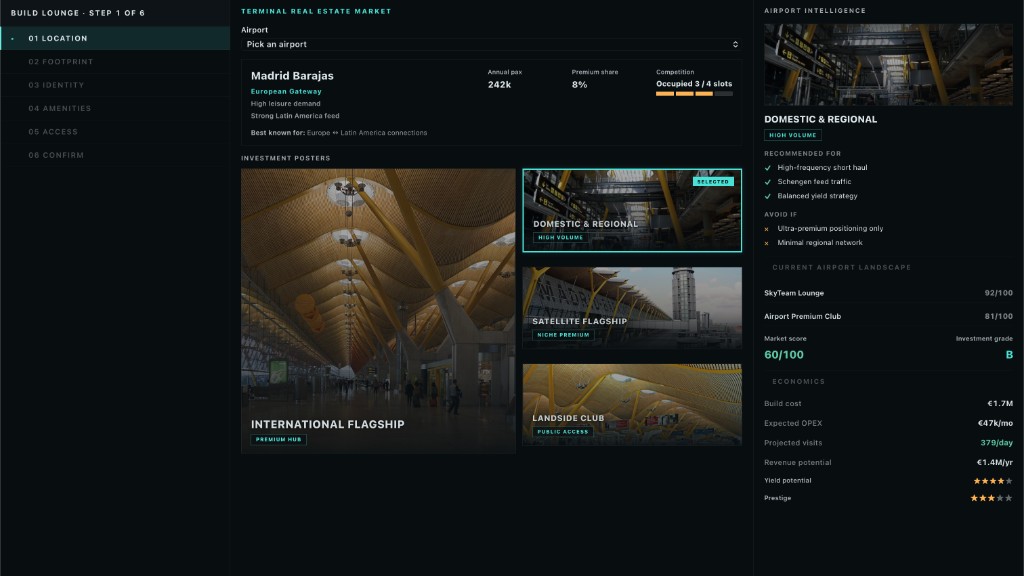
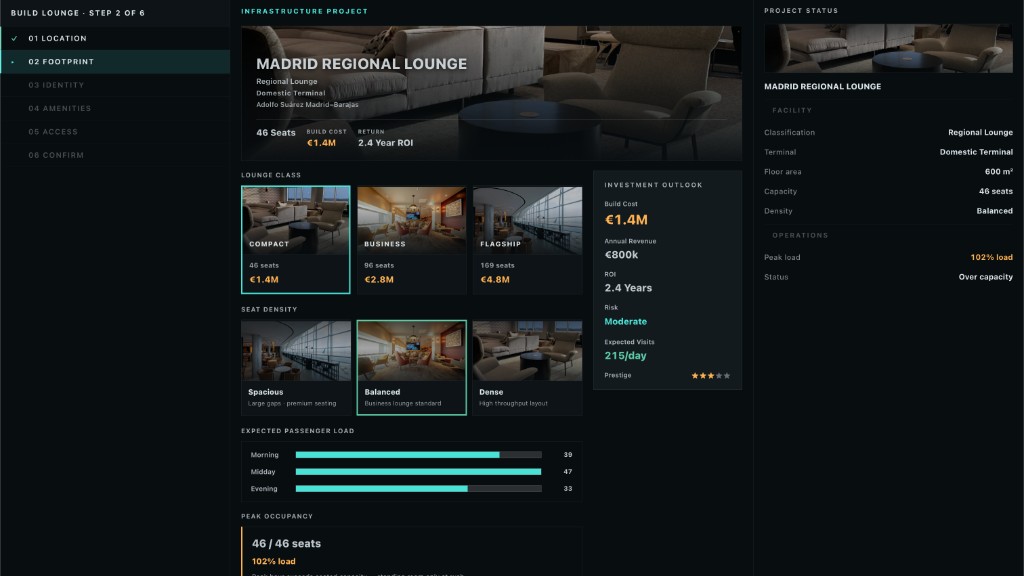
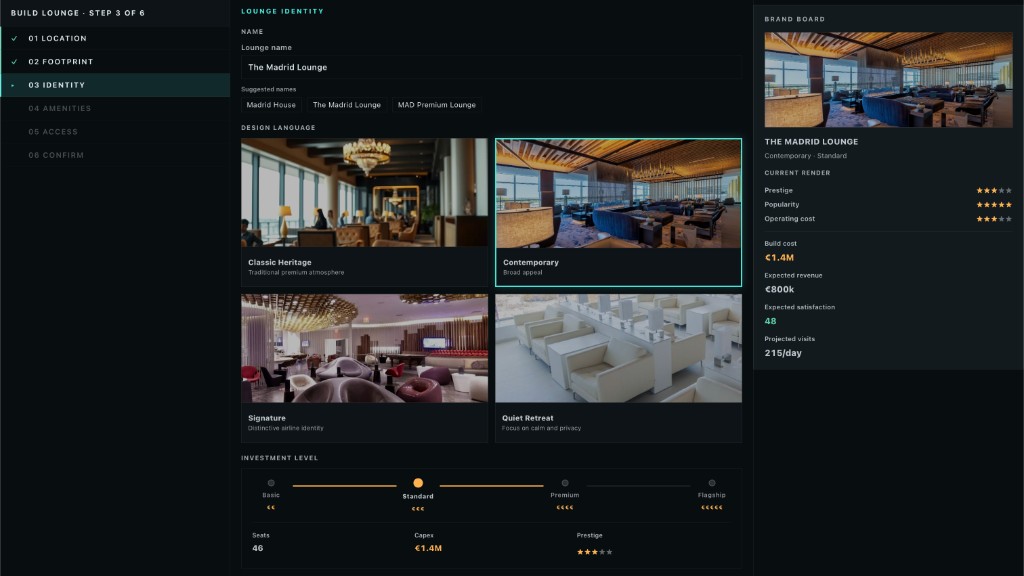
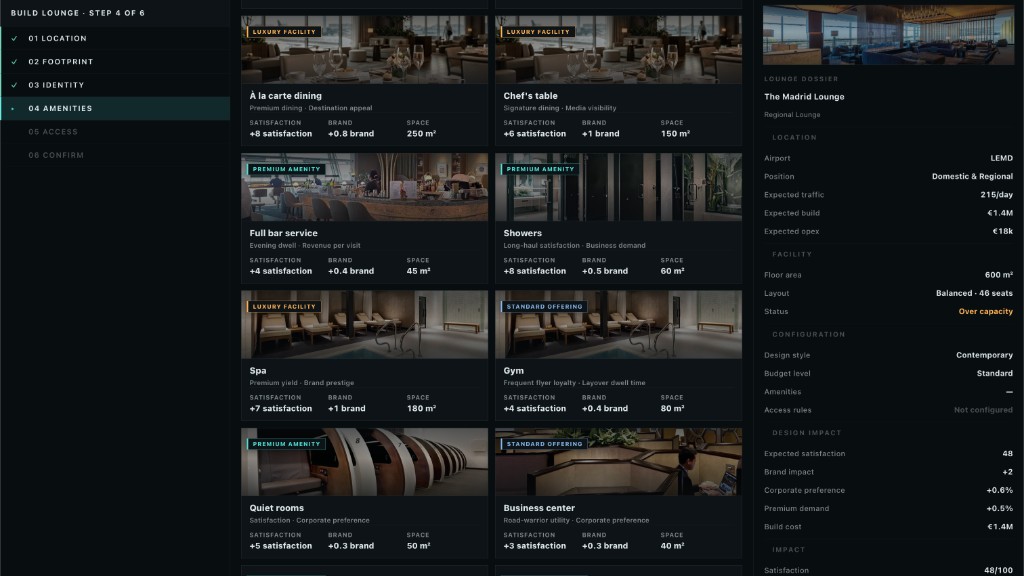
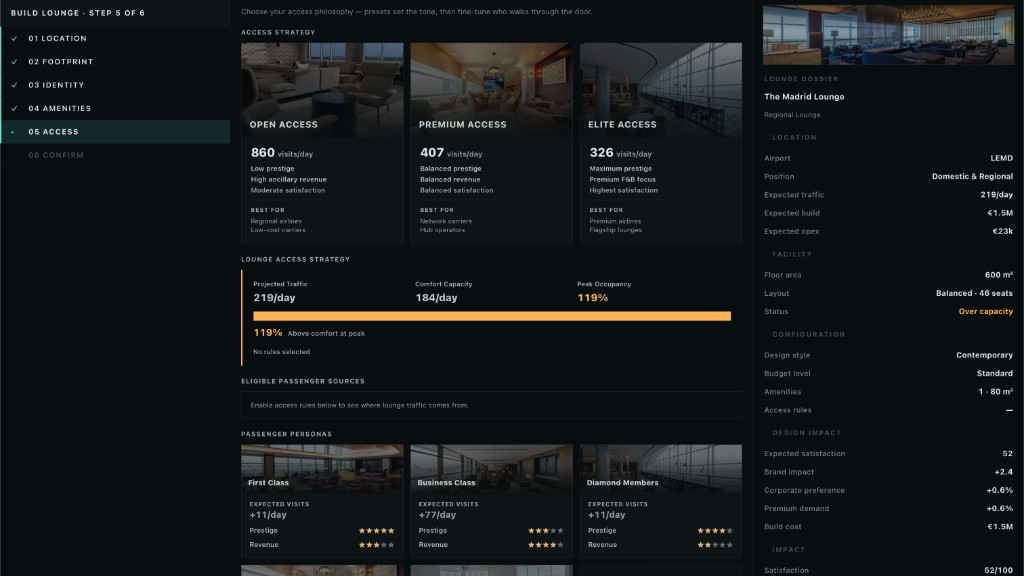
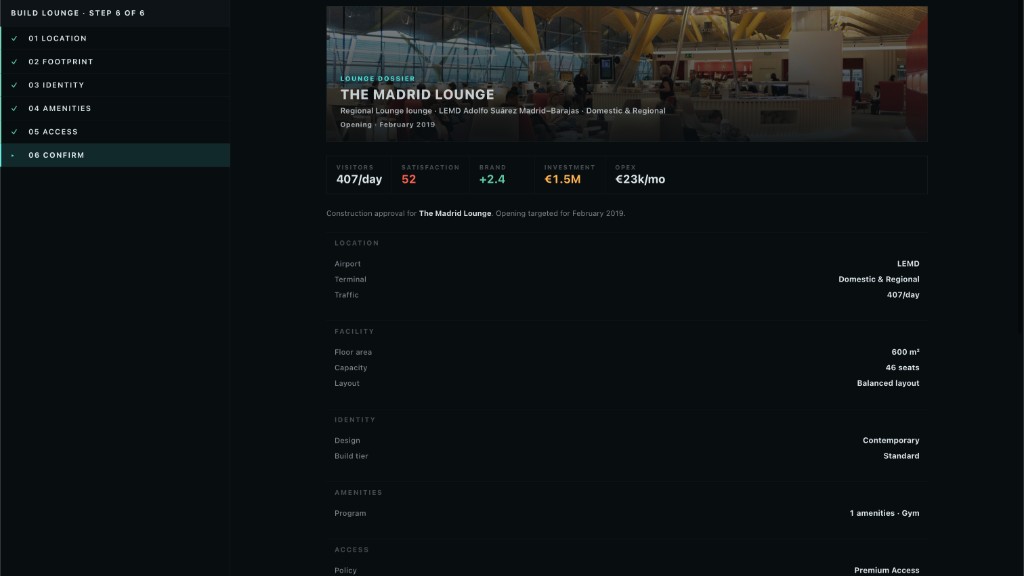
The lounge wizard walks LOCATION → FOOTPRINT → IDENTITY → AMENITIES → ACCESS → CONFIRM. Below is the full flow for The Madrid Lounge at MAD.
Step 1 · Location: pick airport, airside position (Schengen vs non-Schengen matters for passenger mix), and confirm you meet the pax gate.
Step 2 · Footprint: square metres and seat count scale together. Bigger footprint, higher capex and opex, more simultaneous guests.
Step 3 · Identity: name the lounge and pick a design language (modern, heritage, boutique). This is what passengers see on signage and in FFP copy.
Step 4 · Amenities: buffet, bar, showers, quiet zone, kids area, and more. Each amenity adds build cost and shifts the guest experience score.
Step 5 · Access: who gets in: paid walk-up, cardholder, tier thresholds, alliance guests. This is where lounge strategy meets FFP tier design.
Step 6 · Confirm: capex, monthly opex, and payback horizon before you commit.
Launch FFP: six steps (five shown)
The FFP wizard runs NAME → POSITIONING → TIERS → ALLIANCE → PARTNERS → CONFIRM. Step 4 (Alliance) is a strategy fork we did not screenshot here; it sets whether you lean on a global alliance for earn/burn or stay independent. The rest of the flow:
Step 1 · Name: program name locks for 24 months after launch. It appears on cards, lounge branding, and campaign copy.
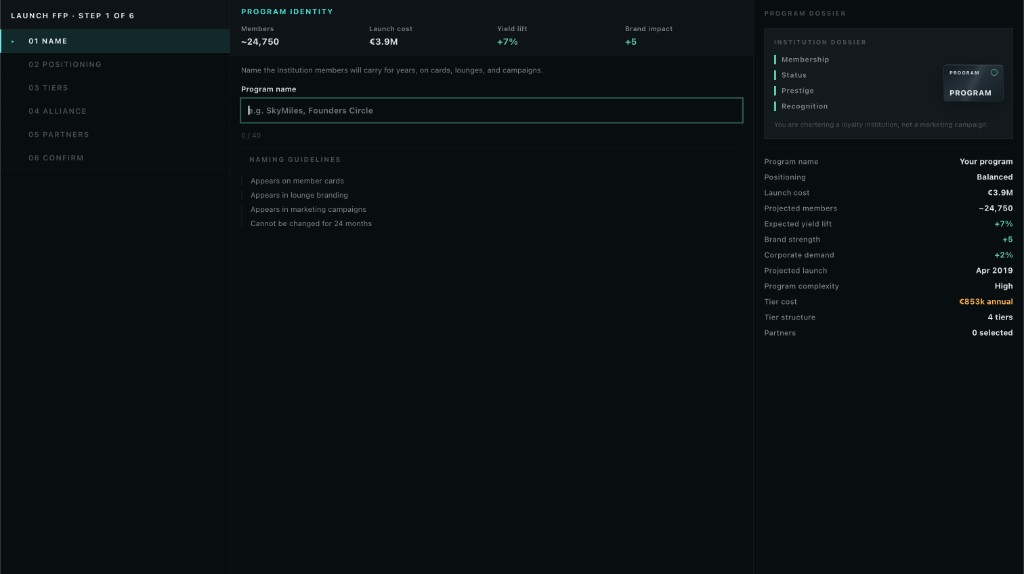
Step 2 · Positioning: audience sliders (leisure vs business, price-sensitive vs premium) feed the customer_profile axis. That multiplier lands between 0.85× and 1.15× on yield for the segments you are targeting. Pick a positioning that matches the network you are actually flying.
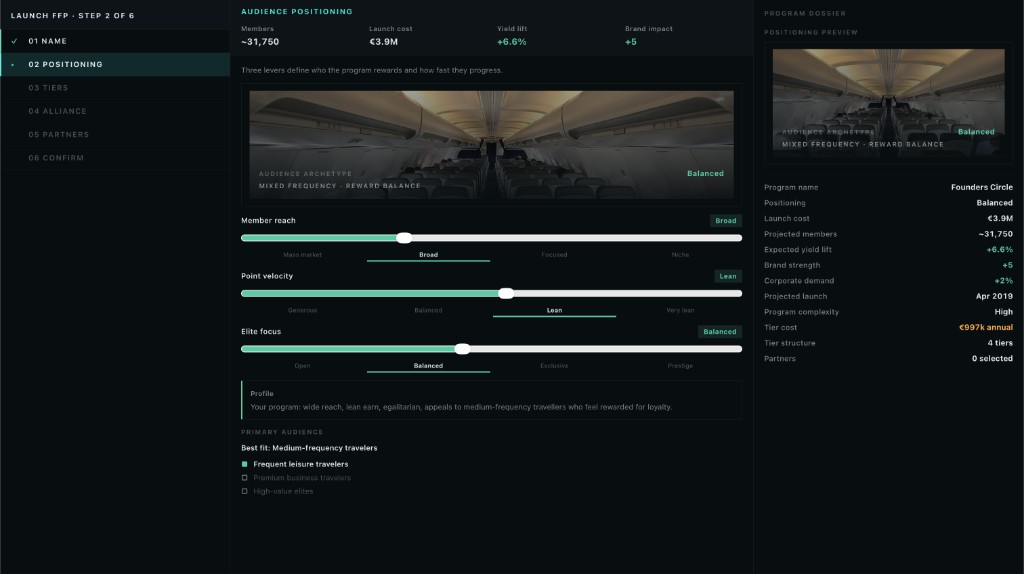
Step 3 · Tiers: default stack is Free / Silver / Gold / Diamond. Assign benefits per tier: priority boarding, bags, lounge access (home vs worldwide), upgrades, concierge. Lounge-gated benefits only apply if you have the lounges to back them.
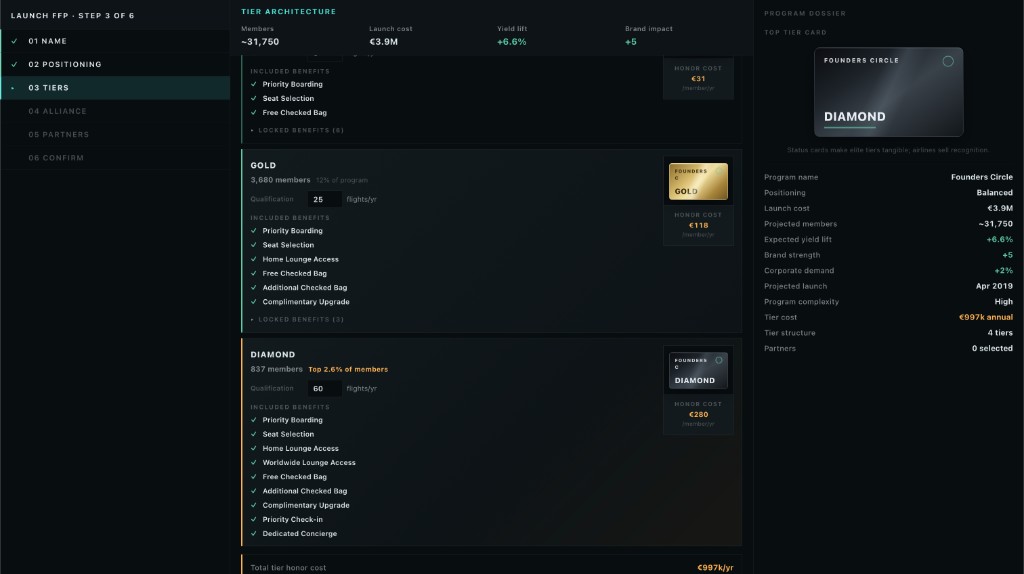
Step 5 · Partners: commercial ecosystem: co-branded credit card (needs brand ≥ 40), hotel, rental car, retail. Each partner adds loyalty depth to your reputation score and gives members earn/burn outside your own metal.
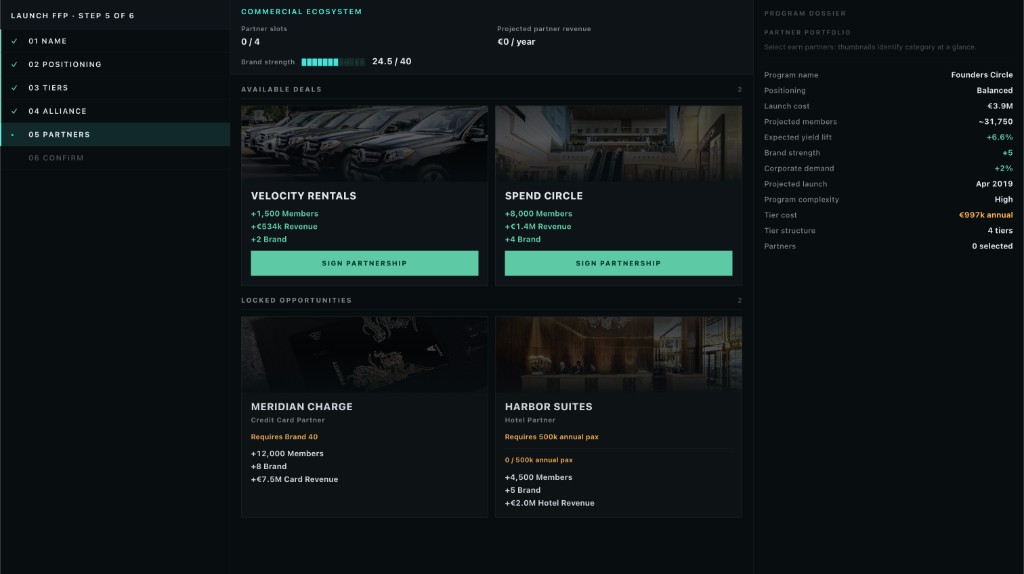
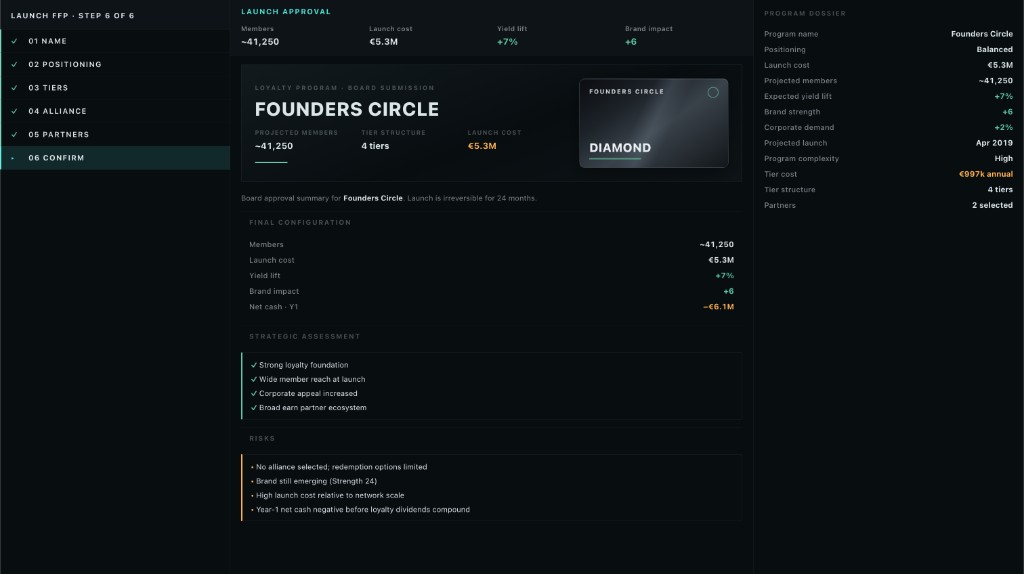
Step 6 · Confirm: launch is irreversible for 24 months. The summary shows tier architecture, partner count, and board approval flags before you commit.
What is still rough
Honest scope for playtest:
- MARKETING · Campaigns tab exists but campaign authoring is thin compared to Identity and Loyalty.
- STRATEGY · Positioning works; we are still tuning how visibly it surfaces in Finance and Dispatch.
- Brand does not yet have a dedicated video slot in the playtest walkthrough (slot 11 is still open). This post is screenshots until we film the wizard flow.
We want founding members to stress-test the gates: launch an FFP too early, build a lounge you cannot fill, watch reputation stall. That feedback shapes what we polish between playtest and Christmas 2026 early access.
What’s next in this series
Road to playtest #2 will cover another system on the July build shortlist. Founding members: register for your Steam key before 17 July.